Mindgrasp AI Notes Review — Is It Worth It? [2026]
.jpg)
Mindgrasp AI Notes
Upload a lecture, PDF or video and get organized study notes back, then reuse the same material for flashcards, quizzes and questions.
Is Mindgrasp AI Notes worth using?
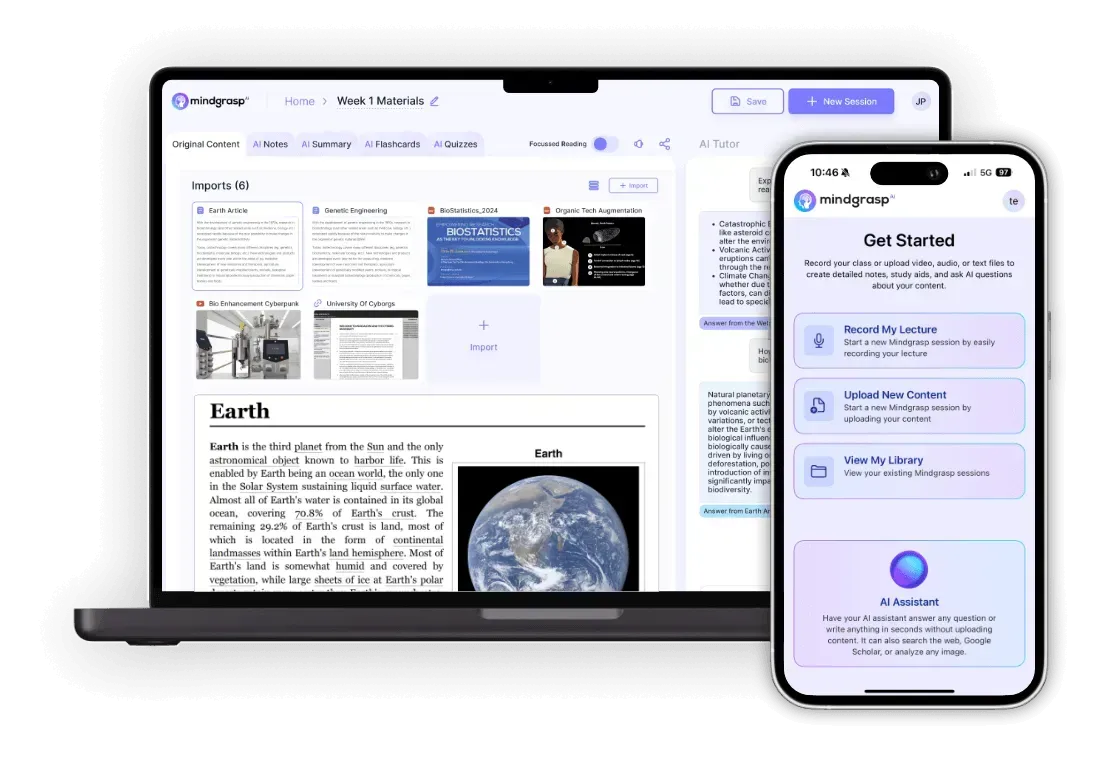
For students drowning in slides and lecture recordings, it is one of the more complete options I have looked at. It accepts PDFs, Word and PowerPoint files, video (MP4, MOV, AVI), audio (MP3, WAV, M4A), YouTube links, URLs, pasted text and live recording, and turns them into structured notes. From the same material you can generate flashcards, quizzes and use an AI tutor, which is the real selling point: the notes are the starting point rather than the end product. The homepage claims 5M+ students, which is Mindgrasp's own number. Watch the limits: the free tier is described as capped at roughly 1,500 words. Mindgrasp's tool pages talk about free access and a free trial but do not list plan prices. Some third-party review sites quote paid plans from around $9.99 a month, but I could not confirm that on Mindgrasp's own pages, so check the current price at sign-up.
Notes that feed the rest of the study toolkit
Mindgrasp's pitch is simple: put class content in, get notes out, then study from them. The notes tool sits alongside summaries, flashcards, quizzes and an AI tutor that is described as available 24/7. There is a Chrome extension that works with Canvas, Blackboard and other websites, and an iOS app for recording live lectures.
What it does
Almost any format you can think of
Documents (PDF, DOCX, PPTX), video (MP4, MOV, AVI), audio (MP3, WAV, M4A), YouTube and web links, pasted text, and live recording are all supported. That covers most of what a semester throws at you.
Structured, review-ready notes
The AI pulls out key points and concepts and organizes them so you are not re-reading a raw transcript. Quality will vary with the source, so skim the results before trusting them for an exam.
Flashcards, quizzes and tutor from the same content
Once notes exist you can generate flashcards and quizzes and ask the AI tutor questions about the material, all in one workspace.
iOS app and Chrome extension
The iOS app records live lectures, and the Chrome extension plugs into Canvas and Blackboard, which is handy if your school uses those.
Full spec sheet
| Documents | PDF, DOCX, PPTX |
| Video | MP4, MOV, AVI, YouTube links |
| Audio | MP3, WAV, M4A, live recording |
| Other inputs | URLs, pasted text |
| Free tier limit | About 1,500 words (per tool page) |
| Languages | 20+ (per homepage) |
| Extras from same content | Summaries, flashcards, quizzes, AI tutor |
| Apps | iOS app, Chrome extension |
| Pricing | Not listed on the tool page |
Pros & Cons
Pros
- Handles documents, video, audio, links and live recording.
- Notes, flashcards, quizzes and tutor in one place.
- iOS app and Chrome extension for Canvas and Blackboard.
- Free access or trial to test before paying.
- 20+ languages supported.
Cons
- Free-tier word limit is small (about 1,500 words).
- Plan prices are not shown on the tool page.
- Notes still need a quick check for accuracy.
- The user count and #1 ranking are Mindgrasp's own claims.
Answers before you buy
What can I turn into notes?
Is Mindgrasp free?
Can it make flashcards and quizzes too?
Does it work with my school's system?
Can I use the TEELA10 coupon?
A strong starting point for study workflows
If you want notes, flashcards and quizzes from the same source, Mindgrasp is convenient. Try the free access with a real lecture before you pay for anything.
This page contains affiliate links. Teelacodes may earn a commission when you click through and complete a qualifying purchase, at no extra cost to you. Read the full disclosure policy. Prices, stock and promotion terms can change without notice — always confirm the final total and availability on mindgrasp.ai before ordering.
Popular Blog